Your cart is empty
You Need To Use These RuneLite Plugins

If you have been playing Old School RuneScape for any amount of time, you already know that the BASE game client can feel a little bare. Clicking around with no extra information, no overlays, no quality of life features. It gets old fast. That is where RUNELITE comes in.
RuneLite is a FREE, open-source third-party client that is fully approved by Jagex. It comes packed with hundreds of plugins, and honestly, most players are not using even half of what is available. So which ones actually matter? Which plugins will genuinely improve your gameplay and help you make more GP?
Let’s get into it.
What Is RuneLite And Why Should You Care?
RuneLite is the most widely used OSRS client. Simple. It runs on top of the original game and adds a massive plugin system that gives you real-time data, visual overlays, timers, and automation helpers that work within the rules of the game.
Is it safe to use? Yes. Jagex officially endorses it. Just download it from runelite.net and nowhere else.
The Plugins You Should Have Enabled Right Now
Here is a breakdown of the most useful plugins, organized by category.
1. Profit and Economy Plugins
These are probably the most important ones if your goal is making GP efficiently.
Grand Exchange Plugin
This one shows you the LIVE price of items right inside the game. You do not need to tab out and check the wiki every five minutes. It pulls data in real time and overlays the price directly on the item tooltip.
Loot Tracker
Loot Tracker logs everything you pick up during a session. Boss drops, slayer tasks, skilling outputs, everything. You can see exactly how much GP per hour you are generating at any activity. This is huge for comparing methods and figuring out where your time is best spent.
If you want to go even deeper on understanding drop rates before you commit to grinding a boss, check out our Rare Drop Simulator. It lets you simulate hundreds of kills and see what your loot distribution might realistically look like.
Inventory Tags
Lets you color code items in your inventory. Sounds simple. Genuinely changes how fast you work. You can set supplies one color and drops another, so you never accidentally drop the wrong thing mid-session.
2. Combat and Bossing Plugins
Entity Hider
In crowded areas like the GRAND EXCHANGE or popular bosses, this plugin hides other players or their pets so you can actually see what is happening on screen. Very underrated.
Special Attack Counter
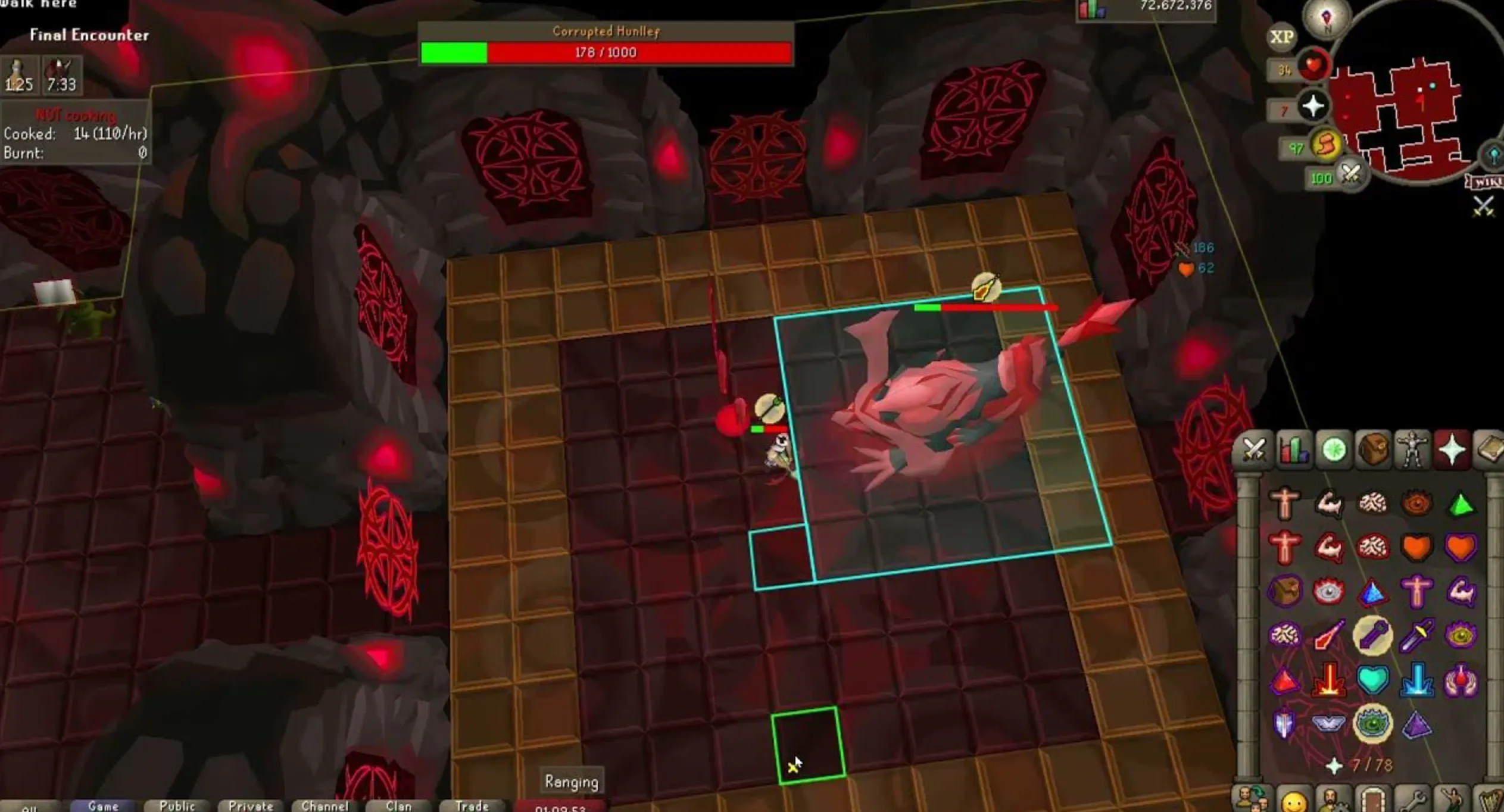
Tracks special attack hits on bosses. Extremely useful at places like CORPOREAL BEAST or group bossing where you need to coordinate specs. Keeps a live counter in the overlay so you know exactly when specs are landing.
Boss Timers
Shows the respawn timer for bosses. You always know exactly when the boss is coming back. No more standing around guessing or misclicking on spawn.
NPC Aggression Timer
When you are AFKing slayer or certain combat tasks, monsters stop aggro on you after a certain amount of time. This plugin shows you exactly when that timer expires so you can reset it. Saves a lot of afk deaths for players who zone out.
3. Skilling Plugins
Agility Plugin
Marks the CORRECT clickspot on every agility obstacle so you do not missclick. It also highlights shortcuts around the map that you might not even know exist. If you are training agility, this plugin is not optional.
Fishing Trawler and Barbarian Assault Plugins
Both of these minigames can be confusing. These plugins add overlays that tell you exactly what to do and when. Especially useful if you are going for the FIGHTER TORSO or ANGLER’S OUTFIT.
Herblore and Farming Timers
Tracks your FARMING PATCH timers so you always know when patches are ready. Herb runs are one of the best passive money methods in the game, and this plugin makes sure you never waste a run window.
4. Utility and Quality of Life Plugins
| Plugin | What It Does |
|---|---|
| Ground Items | Highlights valuable drops on the floor. Never miss a rare. |
| Object Markers | Mark specific objects in the world so they stand out visually. |
| Menu Entry Swapper | Changes the left-click action on NPCs and objects. Saves thousands of clicks per hour. |
| Tile Indicators | Shows exactly which tile your character is standing on. Useful for precise positioning in PvM. |
| Bank Tags | Lets you organize your bank into searchable tagged tabs. Makes restocking 10x faster. |
| XP Tracker | Tracks your experience rates per hour for every skill. Keeps you honest about your efficiency. |
| Clue Scroll Helper | Gives step by step guidance for clue scroll puzzles. No more tabbing to the wiki mid-clue. |
5. PvP and Wilderness Plugins
If you go into the WILDERNESS at all, these are non-negotiable.
Wilderness Level Plugin
Shows the wilderness level at all times on your screen. You always know your risk before stepping deeper.
Player Attack Indicator
In PvP scenarios, this marks which players can attack you based on your combat level difference. Saves you from walking into a skulled fight you did not intend to take.
Skull Plugin
Clearly shows the skull icon on players who are skulled near you. Useful in heavily contested areas.
Plugins That Help With Questing
Questing in OSRS can honestly be one of the most time-consuming parts of the game. Even with RuneLite plugins, some quests just require a lot of prerequisites and preparation.
Quest Helper Plugin
This is probably the single most downloaded plugin on RuneLite. It adds a full step by step guide directly on your screen for every quest in the game. It highlights NPCs, shows required items, marks travel routes, everything. You do not need to have a second screen open with a wiki guide anymore.
Does it make questing easy? Yes and no. The plugin helps you follow the steps, but you still need the STATS and ITEMS to complete the quests. Grand Master quests like Dragon Slayer II or Sins of the Father have serious requirements.
If you want to skip the grind entirely and just get quests done, we offer professional OSRS Quest Completion Services for all major quests including Dragon Slayer II, Song of the Elves, Monkey Madness II and many more. All done by hand, no bots.
A Few Plugins You Should Actually Turn Off
Not every plugin is helpful. Some just clutter your screen or slow the client down.
- GPU Plugin on low-end machines can cause lag. Turn it off if you notice FPS drops.
- Discord Rich Presence shares what you are doing in OSRS to Discord. Not harmful, just unnecessary for most people.
- Camera Zoom can mess with your default zoom settings if configured wrong.
Keep your plugin list focused. More is not always better.
How To Actually Manage Your Plugins
Go into the RuneLite settings panel and use the SEARCH BAR to find any plugin by name. You can also pin frequently used plugins to a sidebar. A lot of players also use the Plugin Hub inside RuneLite which is a community plugin marketplace with even more options beyond the defaults.
Some popular Plugin Hub additions include:
- Boss Fight Timer for personal best tracking
- Pickpocket Helper for thieving training
- Tempoross and Wintertodt helpers for skilling bosses
Final Thoughts
RuneLite is genuinely one of the reasons OSRS has remained so popular. The plugin system turns a 2007 era game into a modern experience without breaking the integrity of the game.
Start with the core plugins. LOOT TRACKER, MENU ENTRY SWAPPER, GROUND ITEMS, QUEST HELPER, and BOSS TIMERS are probably the four that will have the most immediate impact on your gameplay. Then expand from there as you get comfortable.
Want to know how profitable a boss really is before you invest hours of grinding? Try our Rare Drop Simulator to get a realistic look at your loot expectations. And if questing is holding you back from accessing the best content in the game, our Quest Services are there when you need them.
Play smarter. Not harder.