Your cart is empty

Too Many Login Attempts OSRS – Causes and Solutions
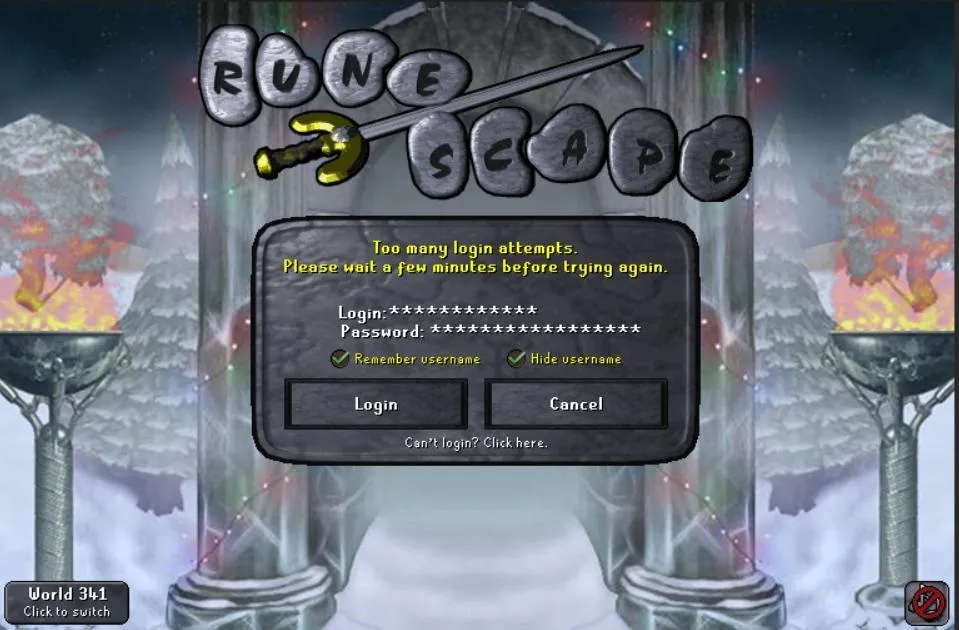
Old School RuneScape (OSRS) is a beloved MMORPG that captivates millions with its nostalgic gameplay. However, encountering the frustrating “Too Many Login Attempts” error can halt your adventure in Gielinor. This error typically occurs when the game server detects multiple failed login attempts, temporarily locking you out. In this comprehensive guide, we’ll explore why this error happens, how to fix it, and how to prevent it, ensuring you get back to questing, skilling, or bossing without delay.
The “Too Many Login Attempts” error in OSRS is a security measure designed to protect your account from unauthorized access. It triggers when the game’s servers register repeated login attempts in a short period, often due to incorrect credentials or external factors. Understanding the root causes is the first step to resolving this issue.
Incorrect Username or Password
One of the most common reasons for this error is entering the wrong username or password multiple times. OSRS servers interpret these repeated failed attempts as potential brute-force attacks, locking you out temporarily to safeguard your account.
Multiple Devices or Locations
Logging in from different devices or locations in quick succession can flag your account. For example, switching between your phone and PC or using a VPN with varying IP addresses may confuse the servers, triggering the error.
Third-Party Clients
Using unofficial clients or bots can lead to rapid login attempts, especially if they malfunction or attempt to reconnect repeatedly. While some third-party clients like RuneLite are approved, others may violate Jagex’s terms and cause issues.
Server-Side Issues
Occasionally, Jagex’s servers experience glitches or maintenance, leading to login errors. High server load during peak times or after updates can also contribute to this problem.
How to Fix the Too Many Login Attempts Error
Once you encounter this error, don’t panic. There are several straightforward steps you can take to resolve it and regain access to OSRS. Follow these solutions in order to get back into the game as quickly as possible.
Wait for the Lockout Period
The simplest fix is to wait. The lockout typically lasts 5 to 30 minutes, depending on the number of failed attempts. Avoid trying to log in during this period, as additional attempts may extend the lockout.
Check Your Credentials
Double-check your username and password. If you’re unsure, use the OSRS account recovery tool on the official website to reset your password. Ensure you’re logging in with the correct email associated with your Jagex account.
Disable VPN or Proxy
If you’re using a VPN, turn it off and attempt to log in from your actual IP address. Alternatively, if you must use a VPN, connect to a single server consistently to avoid IP conflicts.
Switch to Official Client
If you’re using a third-party client, switch to the official OSRS client or a trusted one like RuneLite. Ensure the client is up-to-date to avoid compatibility issues that might cause login errors.
Contact Jagex Support
If the issue persists, reach out to Jagex Support through the official OSRS website. Provide details like your account name, the time of the error, and any relevant screenshots to expedite the process.
Preventing the Error in the Future
Prevention is better than cure. By taking proactive steps, you can minimize the chances of encountering the “Too Many Login Attempts” error again. Here are some practical tips to keep your account secure and accessible.
Enable Two-Factor Authentication (2FA)
Activating 2FA adds an extra layer of security to your account. Use an authenticator app like Google Authenticator or Authy to generate codes, reducing the risk of unauthorized login attempts.
Use a Strong, Unique Password
Create a password that’s at least 12 characters long, combining letters, numbers, and symbols. Avoid reusing passwords across platforms to prevent credential leaks from other sites affecting your OSRS account.
Stick to Consistent Devices and Networks
Log in from the same devices and networks whenever possible. If you travel frequently, inform Jagex via their support page to flag your account for multi-location access.
Monitor Account Activity
Regularly check your account’s login history on the Jagex website. If you notice unfamiliar activity, change your password immediately and enable 2FA if not already active.
Common Myths About the Too Many Login Attempts Error
Misinformation about this error can lead to confusion or unnecessary worry. Let’s debunk some common myths circulating in the OSRS community.
My Account Is Hacked
While the error might feel alarming, it doesn’t necessarily mean your account is compromised. It’s often just a security measure triggered by benign actions like mistyping your password.
Third-Party Clients Are Always Safe
Not all third-party clients are reliable. Only use Jagex-approved clients like RuneLite, and avoid any that promise automation or violate game rules.
The Error Is Permanent
The lockout is temporary in most cases. Permanent bans are separate and usually involve violations like botting or real-world trading, not login errors.
When to Seek Help from Jagex
In some cases, the error may persist despite trying all fixes, or you may suspect foul play. Knowing when and how to contact Jagex can save you time and stress.
Signs You Need Support
Contact Jagex if you experience:
- Prolonged lockouts lasting over an hour.
- Unrecognized login attempts in your account history.
- Password reset issues or inability to access recovery options.
How to Reach Jagex
Visit the OSRS Support Center on the official website. Submit a ticket under “Login Issues” and provide detailed information. Avoid posting sensitive details like passwords publicly on forums or social media.
What to Expect
Jagex typically responds within 24-48 hours, though high ticket volumes may cause delays. Be patient and check your email (including spam) for updates.
| Solution | Description | Time to Implement |
|---|---|---|
| Wait Out Lockout | Stop attempting to log in for 5-30 minutes. | 5-30 minutes |
| Verify Credentials | Ensure username and password are correct; reset if needed. | 5 minutes |
| Disable VPN | Turn off VPN or use a consistent server. | 2 minutes |
| Use Official Client | Switch to Jagex’s client or RuneLite. | 10 minutes |
| Contact Support | Submit a ticket to Jagex for persistent issues. | 24-48 hours |
By understanding the causes, applying the right fixes, and adopting preventive measures, you can tackle the “Too Many Login Attempts” error in OSRS effectively. Keep your account secure with 2FA, strong passwords, and trusted clients to enjoy uninterrupted adventures in Old School RuneScape. If issues persist, Jagex Support is there to help. Now, get back to slaying dragons or skilling in Gielinor!