Your cart is empty
How to Change Your Login Email in OSRS

Changing your login email in Old School RuneScape (OSRS) is an important process for maintaining account security and ensuring you receive important updates. Whether you’re updating to a new email address or securing your account, it’s essential to follow the correct steps. This guide will provide you with a straightforward approach to changing your login email efficiently, ensuring that you can continue enjoying your gaming experience without interruption.
To change your login email in OSRS, follow these detailed steps:
- Log into Your Account: Start by visiting the official OSRS website. Click on the “Log in” button and enter your username and password to access your account.
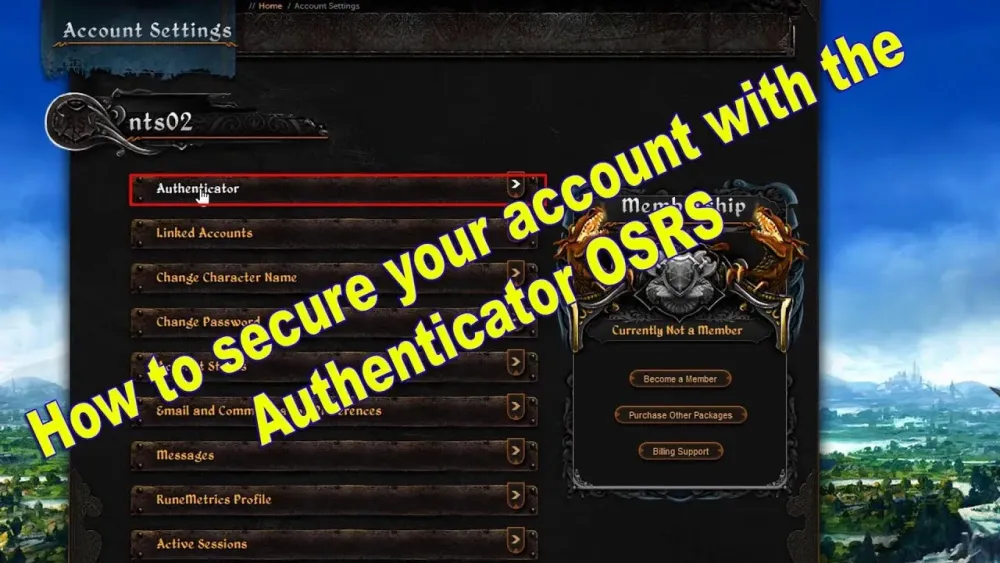
- Access Account Management: Once logged in, navigate to the “Account Management” section. This can typically be found in your account settings or profile area.
- Select Email Change Option: Look for the option that allows you to change your email address. This might be labeled as “Change Email” or “Email Settings.”
- Verify Your Identity: For security reasons, you may be required to verify your identity. This could involve answering security questions or entering a verification code sent to your current email address.
- Enter New Email Address: Once verified, you will be prompted to enter your new email address. Ensure that you type it correctly to avoid any issues.
- Confirm the Change: After entering the new email, you will likely need to confirm it by clicking on a link sent to your new email address. Check your inbox (and spam folder) for this confirmation email.
- Log Out and Back In: For changes to take effect, log out of your account and log back in using your new email address as your login credential.
- Update Recovery Options: Lastly, after changing your email, consider updating your recovery options. This ensures that you can regain access to your account if you forget your login details.
By following these steps, you can successfully change your login email in OSRS. Always remember to keep your login credentials secure and updated to protect your gaming account.
Common Issues When Changing Your Login Email
Changing your login email in Old School RuneScape (OSRS) can be a pretty straightforward process, but sometimes things can go wrong. Here are some common issues that players encounter:
- Verification Emails Not Received: Sometimes, the verification email might not show up in your inbox. This can happen due to spam filters or incorrect email addresses being entered.
- Account Recovery Delays: If you’ve recently changed your email or forgot your password, you might face delays in recovering your account. Always ensure you have access to your registered email for smooth recovery.
- Email Already in Use: If you attempt to change your email to one that is already linked to another account, you’ll encounter an error. Make sure the new email is not associated with any other OSRS account.
- Two-Factor Authentication Conflicts: If you have Two-Factor Authentication (2FA) set up, you might need to disable it momentarily before changing your email. Forgetting this step can lead to complications.
- Temporary Lock on Account: After multiple failed attempts to change your email, your account may be temporarily locked. This is a security measure to protect your account from unauthorized access.
To avoid these issues, double-check your email address, keep an eye on your spam folder, and ensure that your account information is up to date. If problems persist, contacting Jagex support can help resolve any lingering issues.
Tips for Keeping Your Account Secure
Your OSRS account is a treasure trove of time and effort, so keeping it secure is essential. Here are some handy tips to ensure your account remains safe:
- Use a Strong Password: Create a unique password that combines letters, numbers, and symbols. Avoid using easily guessed information like birthdays or common words.
- Enable Two-Factor Authentication: 2FA adds an extra layer of security. Even if someone gets your password, they’ll still need access to your 2FA method.
- Change Your Email Regularly: Regularly updating your login email can help protect your account from being compromised. Choose a secure email provider with good spam filters.
- Be Wary of Phishing Attempts: Always be cautious of unsolicited emails or messages asking for your login details. Jagex will never ask for your password or personal information.
- Keep Your Computer Secure: Use antivirus software and keep your operating system up to date. This helps prevent malware that can compromise your login information.
By following these tips, you’ll significantly reduce the risk of your OSRS account being hacked or compromised. Remember, a little caution goes a long way in keeping your virtual adventures safe!
5. What to Do If You Can’t Access Your Old Email
If you find yourself unable to access your old email account, don’t worry! There are steps you can take to regain access to your OSRS account and change your login email. Here’s what you can do:
- Recover Your Email Account: The first step is to try to recover your old email account. Most email providers offer recovery options, such as password resets or security questions. Visit your email provider’s website and follow their recovery process.
- Contact OSRS Support: If recovering your email isn’t an option, reach out to the Old School RuneScape support team. You can submit a ticket through their official support page. Be prepared to provide information such as:
- Your OSRS username
- Details about your account, like creation date and any previous passwords
- Any payment history if applicable
- Provide Proof of Ownership: To verify your identity, Jagex may ask for proof that you own the account. This could include screenshots of your gameplay, or any in-game items you have. The more information you provide, the better your chances of recovering your account.
- Set a New Email: Once your identity is verified, OSRS support can assist you in changing your login email. You may be required to provide a new email address that you can access.
Remember, patience is key when dealing with account recovery. It might take some time, but persistence will pay off!
6. Frequently Asked Questions
Changing your login email in OSRS can raise questions, especially if you encounter issues. Here are some frequently asked questions to help guide you through the process:
| Question | Answer |
|---|---|
| Can I change my login email without access to my old email? | Yes, you can contact OSRS support for assistance. You will need to verify your account ownership. |
| How long does it take to change my email? | The process can vary. If everything goes smoothly, it might take a few hours, but it can take longer if there are complications. |
| Will I lose my account if I can’t access my old email? | No, as long as you can prove ownership of your account, you can recover it. |
| What information do I need to provide to support? | Be ready to provide your username, previous passwords, account creation details, and any payment history. |
If you have any other questions or concerns, don’t hesitate to reach out to the OSRS community or support team for help. You’re not alone in this process!