Your cart is empty

Everything You Need to Know About Fairy Ring Access in Your OSRS Player Owned House
Player Owned Houses (POHs) in Old School RuneScape (OSRS) offer players a unique space to personalize, build, and manage their own homes. This feature not only enhances the gameplay experience but also allows for various functionalities like teleportation, skill training, and storage. Understanding the mechanics of POHs is crucial for players looking to maximize their efficiency and enjoyment in the game. One of the notable features associated with POHs is the Fairy Ring system, which provides an innovative way to travel across Gielinor.
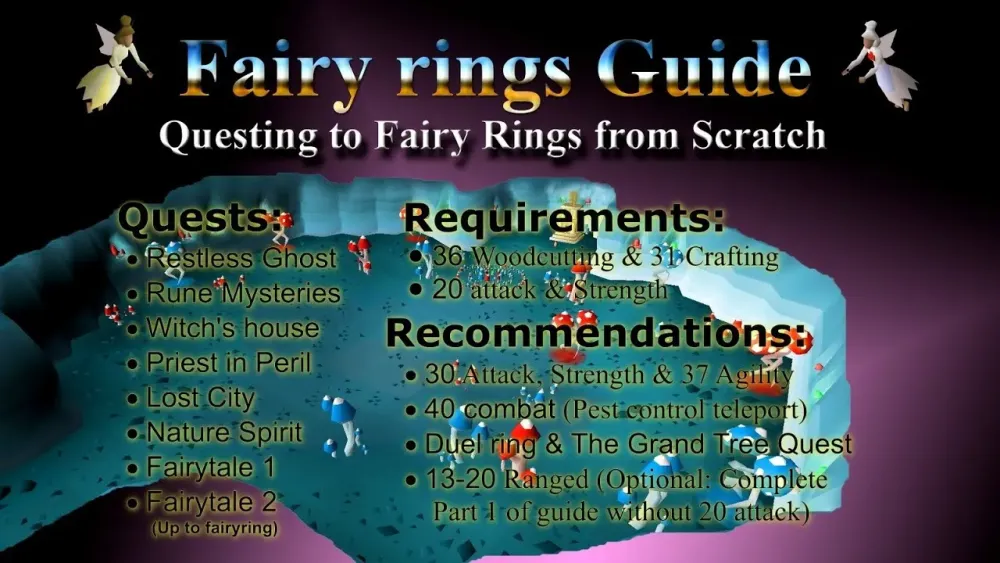
Fairy Rings are magical transportation devices found throughout Gielinor in OSRS. They are part of the Fairy Tale quest series and provide players with a unique method of fast travel. To access a Fairy Ring, players must first complete specific quests that unlock their functionality, particularly the Fairy Tale I quest. Once unlocked, players can use the rings by selecting different codes that correspond to various locations around the game world.
The importance of Fairy Rings lies in their ability to significantly reduce travel time, which is critical for efficient gameplay. Players can quickly reach resource locations, quest areas, or even other players, enhancing the overall experience. For instance, a player can access the ring near their Player Owned House and teleport to far-off regions, making it easier to gather materials or complete quests without the need for excessive running or transportation methods.
In the context of Player Owned Houses, Fairy Rings can be particularly beneficial. Players can set their houses in strategic locations close to Fairy Rings to maximize their efficiency. For example, placing a house near a Fairy Ring allows for quick access to various resources required for construction or skill training, ultimately saving time and effort. Additionally, the use of Fairy Rings can be incorporated into house designs, facilitating easier access for guests or friends visiting your POH.
Moreover, Fairy Rings can serve as a hub when hosting events or competitions within your POH. By providing a quick teleportation method, players can gather swiftly and efficiently, enhancing the overall experience of social activities in the game. In summary, understanding the role of Fairy Rings in conjunction with Player Owned Houses can greatly improve your gameplay, making it a vital aspect for any OSRS player looking to optimize their experience.
How to Unlock Fairy Rings in Your Player Owned House
Unlocking Fairy Rings in your Player Owned House (POH) in Old School RuneScape (OSRS) is a straightforward process, but it does require a few steps. Here’s how you can easily gain access:
- Obtain the Fairy Tale II: Cure a Queen Quest: The first step is to complete the Fairy Tale II quest. This quest is crucial because it gives you the ability to access the fairy ring network. To start the quest, speak to the Fairy Godfather in the Tree Gnome Stronghold.
- Gain Access to Fairy Rings: After completing Fairy Tale II, you’ll need to unlock the fairy rings by using the ones located in the various fairy circles around Gielinor. Make sure to activate at least one fairy ring; this will link your POH to the fairy ring network.
- Build a Fairy Ring in Your POH: Now that you’ve completed the quest and activated a fairy ring, you can build your own fairy ring in your house. You’ll need to have a construction level of at least 85 and some materials like planks and nails to build it.
- Use the Construction Menu: Open your construction menu, select the fairy ring option, then place it in your desired location within your POH.
Once you’ve completed these steps, you’ll have full access to the Fairy Ring network right from the comfort of your own house!
Step-by-Step Guide to Using Fairy Rings
Utilizing the Fairy Rings in your Player Owned House is simple and can save you a lot of time when traveling across Gielinor. Here’s a step-by-step guide to help you get started:
- Enter Your Player Owned House: First things first, head into your Player Owned House. If you have a fairy ring installed, you’ll find it in your house.
- Interact with the Fairy Ring: Once inside, approach the fairy ring. You’ll see an option to use it. Click on it, and a menu will pop up with various travel options.
- Select Your Destination: The menu will display a list of possible destinations. Each destination is represented by a unique code (like “B L R” or “C K S”). Choose the code corresponding to where you want to travel.
- Confirm Your Travel: After selecting your desired destination, click “Okay” to confirm your travel. You’ll be instantly transported to the chosen location!
- Enjoy the Journey: Now that you’ve arrived at your destination, you can continue your adventures, whether it’s questing, skilling, or simply exploring!
Using fairy rings is not just about convenience; it’s an essential tool for any serious OSRS player. So, make sure to take advantage of this fantastic feature in your Player Owned House!
5. Benefits of Having a Fairy Ring in Your House
Having a Fairy Ring in your OSRS Player Owned House can significantly enhance your gameplay experience. Here are some of the key benefits:
- Fast Travel: The primary advantage of a Fairy Ring is the ability to travel quickly across Gielinor. This feature saves you time and allows you to engage in activities without the hassle of long travel times.
- Access to Rare Locations: Certain Fairy Rings provide access to unique spots that may be beneficial for quests, training, or resource gathering. For instance, you can reach areas like Zanaris or other remote locations with ease.
- Convenience for Quests: Many quests require you to visit various locations. With a Fairy Ring at your disposal, you can complete these tasks more efficiently, reducing the time spent running around.
- Resource Gathering: If you’re into skilling or gathering materials, having a Fairy Ring can help you quickly reach resource-rich areas. This is especially useful for players who are working on skills like Woodcutting or Fishing.
- Social Engagement: Hosting friends at your house or inviting them to join you in activities becomes easier with quick access to different locations, thanks to the Fairy Ring’s travel capabilities.
In summary, integrating a Fairy Ring into your Player Owned House not only boosts your efficiency but also enriches your overall gameplay experience.
6. Common Issues and Troubleshooting Tips
While having a Fairy Ring in your OSRS Player Owned House is beneficial, you may encounter some common issues. Here’s a list of potential problems and troubleshooting tips to help you out:
- Fairy Ring Not Working: If the Fairy Ring isn’t functioning, ensure that you’ve constructed it correctly in your house. Check that you’ve met all requirements for using it, such as having completed specific quests.
- Connection Issues: Sometimes, server problems can cause the Fairy Ring to be unresponsive. If you suspect this is the case, try logging out and back in, or check the official OSRS status page for any ongoing issues.
- Location Confusion: Make sure you are using the correct codes for the Fairy Rings. Double-check your chosen destination, as entering the wrong code can lead to unexpected locations.
- House Settings: Ensure your house is set to public if you’re trying to show it off to friends. If your house is private, they won’t be able to use the Fairy Ring.
- Not Enough Energy: If you find yourself unable to teleport, ensure you have enough run energy. Running out can prevent you from using the Fairy Ring effectively.
By keeping these troubleshooting tips in mind, you can resolve common issues related to Fairy Rings in your Player Owned House and make the most of your adventures in Gielinor.
Everything You Need to Know About Fairy Ring Access in Your OSRS Player Owned House
Fairy Rings are a unique and convenient teleportation system in Old School RuneScape (OSRS) that allows players to travel quickly across Gielinor. When it comes to utilizing Fairy Rings in your Player Owned House (POH), there are several important aspects to consider.
1. Fairy Ring Locations:
- Access to Fairy Rings is available in various locations throughout Gielinor, such as the Tree Gnome Stronghold, Zanaris, and near the Lumbridge Swamp.
- By completing the quest “Fairy Tale II – Cure a Queen,” players unlock the ability to use the Fairy Ring network.
2. How to Access Fairy Rings from Your POH:
To use a Fairy Ring directly from your Player Owned House, you must have a specific setup:
- Build a Portal Chamber in your POH, which allows you to teleport to the Fairy Ring network.
- Ensure you have the required construction level and materials to build the portal.
3. Benefits of Fairy Ring Access in Your POH:
| Benefit | Description |
|---|---|
| Convenience | Quickly travel to various locations without backtracking. |
| Efficiency | Access to training spots, quests, and resources faster. |
| Time-Saving | Reduce downtime spent traveling between locations. |
By incorporating the Fairy Ring access feature into your Player Owned House, you can enhance your gameplay experience significantly. With strategic planning and the right upgrades, your POH can become a central hub for efficient exploration and resource gathering.
Conclusion: Maximizing your Player Owned House experience involves leveraging Fairy Ring access to streamline your journey across Gielinor, ensuring you spend more time enjoying the game and less time traveling.