Your cart is empty

How to Master OSRS Game Center Login: A Complete Guide for 2025

Old School RuneScape (OSRS) remains a beloved MMORPG, captivating players with its nostalgic charm and engaging gameplay. For iOS users, logging in via Game Center offers a seamless way to jump into Gielinor without juggling extra credentials. However, the OSRS Game Center login process can confuse new and returning players alike, especially when transitioning between devices like mobile and desktop. In this comprehensive guide, we’ll walk you through everything you need to know about OSRS Game Center login in 2025—how to set it up, troubleshoot issues, and play across platforms effortlessly. Whether you’re a seasoned adventurer or a fresh face in Tutorial Island, this blog post is your key to unlocking a smooth login experience.
Game Center is Apple’s gaming hub for iOS devices, allowing users to manage game progress and logins using their Apple ID. In OSRS, this feature lets iOS players create and access their accounts without setting up a traditional Jagex username and password initially. It’s a quick-start option designed for convenience, but it comes with nuances that can trip up players—especially when they want to play on non-Apple devices.
Why Use Game Center for OSRS?
Here’s why Game Center login stands out:
- Instant Access: No need to create a separate Jagex account upfront—just tap and play.
- Cross-Device Sync: Log in across iPhones and iPads using the same Apple ID.
- Simplified Credentials: Your Apple ID handles authentication, reducing password fatigue.
Limitations of Game Center Login
While convenient, it’s not perfect:
- Desktop Incompatibility: You can’t log into the desktop client without linking an email.
- Single Account Restriction: Game Center ties to one OSRS account per Apple ID, limiting multi-account play.
- Security Dependency: Relies on your Apple ID’s security—lose access, and you’re locked out.
How to Set Up OSRS Game Center Login
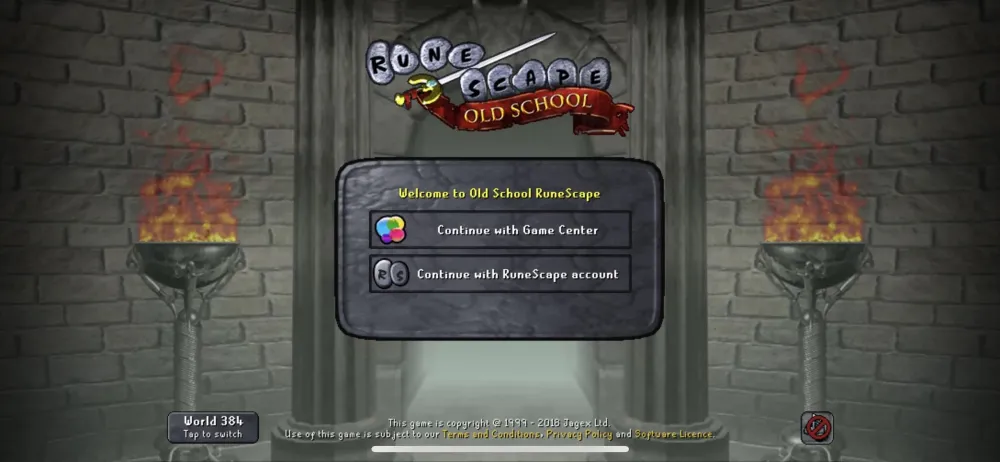
Getting started with Game Center login is straightforward if you’re on an iOS device. Follow these steps to dive into OSRS without delay.
Step-by-Step Setup Guide
- Install OSRS Mobile: Download the Old School RuneScape app from the App Store.
- Launch the App: Open it and wait for the login screen to appear.
- Select Game Center: Tap “Continue with Game Center” instead of entering credentials.
- Authenticate: Sign in with your Apple ID if prompted. Ensure you’re using an active Game Center account.
- Create or Load Character: If it’s your first time, you’ll start a new character. Otherwise, it loads your existing Game Center-linked account.
Tips for a Smooth Setup
- Ensure your iOS device is updated to avoid compatibility issues.
- Double-check that Game Center is enabled in your iPhone or iPad settings (Settings > Game Center).
- Use a strong Apple ID password to secure your account from the get-go.
Transitioning from Game Center to Desktop Play
One of the biggest hurdles for Game Center users is playing OSRS on a PC. Since the desktop client doesn’t support direct Game Center login, you’ll need to link your account to a Jagex email. Here’s how to make the switch in 2025.
Linking Your Game Center Account
- Log In on Mobile: Open OSRS on your iOS device using Game Center.
- Access Account Settings: Go to the “Account” tab in-game.
- Link an Email: If you see “Link Email,” tap it. If it says “View Inbox,” your account is already linked—skip to step 5.
- Set Up Credentials: Enter a valid email and create a password. Confirm via the email link sent by Jagex.
- Test Desktop Login: Download the OSRS client on your PC, then log in with your new email and password.
Common Linking Issues and Fixes
| Issue | Solution |
|---|---|
| No “Link Email” option | Log into the OSRS website with your Apple ID, then add an email under Account Settings. |
| Email not received | Check spam/junk folders or resend the confirmation link. |
| New character on PC | Ensure you’re using the linked email, not your Apple ID, on the desktop client. |
Troubleshooting OSRS Game Center Login Problems
Even with its simplicity, Game Center login can hit snags. Let’s tackle the most common issues and their solutions to keep you in the game.
Login Fails on iOS
- Check Apple ID: Verify you’re signed into the correct Apple ID in Game Center settings.
- App Restart: Close and reopen OSRS, then try logging in again.
- Update Software: Ensure both OSRS and your iOS version are up to date.
Account Access Lost
If you’ve forgotten your Apple ID or switched devices:
- Recover Apple ID: Use Apple’s recovery process (iforgot.apple.com) to regain access.
- Contact Jagex Support: If linked to an email, submit a recovery request with your account details.
- New Device Setup: Sign into the same Apple ID on your new device to sync your account.
Authenticator Setup Challenges
Securing your account with two-factor authentication (2FA) is trickier with Game Center:
- Link an email as described above.
- Visit the OSRS website, log in with your Apple ID, and enable the authenticator under Security settings.
- Scan the QR code with an app like Google Authenticator and save your recovery codes.
Optimizing Your OSRS Experience with Game Center
Once you’ve mastered the login process, you can enhance your gameplay. Here’s how to leverage Game Center and beyond for the best OSRS experience in 2025.
Cross-Platform Play Made Easy
After linking your account, enjoy OSRS on any device:
- Mobile Flexibility: Use Game Center for quick sessions on your iPhone or iPad.
- Desktop Precision: Switch to PC for complex tasks like bossing or skilling with a larger screen.
- Progress Sync: Your stats, items, and quests update seamlessly across platforms.
Security Best Practices
Protect your account with these tips:
- Enable 2FA: Add an authenticator after linking an email for extra security.
- Strong Passwords: Use a unique, complex password for your Jagex account.
- Avoid Phishing: Only log in via official OSRS channels (website, app, or client).
Why Upgrade to a Jagex Account?
While Game Center is great for starters, upgrading to a full Jagex account offers:
- Multi-Platform Access: Play anywhere without Apple ID dependency.
- Enhanced Security: Direct control over 2FA and recovery options.
- Future-Proofing: Jagex is phasing in account upgrades for all players—stay ahead of the curve.
Final Thoughts
The OSRS Game Center login is a fantastic entry point for iOS players, offering a hassle-free way to explore Gielinor. However, to fully embrace the game’s potential—especially across devices—linking to a Jagex account is a must. By following this guide, you’ll navigate setup, troubleshooting, and optimization like a pro. Ready to slay dragons, complete quests, or grind skills? Log in today and make 2025 your year in Old School RuneScape. Share your experiences or questions in the comments below—happy adventuring!
